This website uses cookies strictly necessary for its proper functioning. For more details, please see our .

Chrome Extension Guide
Welcome to the Eye Guardian Experience
Learn how to maximize your Eye Guardian extension for optimal blue light protection, smart break reminders, and enhanced digital wellness.
What's New in v3.2.0!
Customize the blue light filter intensity for individual websites — set a different level for dark-mode sites, video platforms, or anything else that deserves its own setting. Available to Premium members.
Quick Setup Guide
Pin Eye Guardian
Click on extension > Pin Eye Guardian
Open Extension
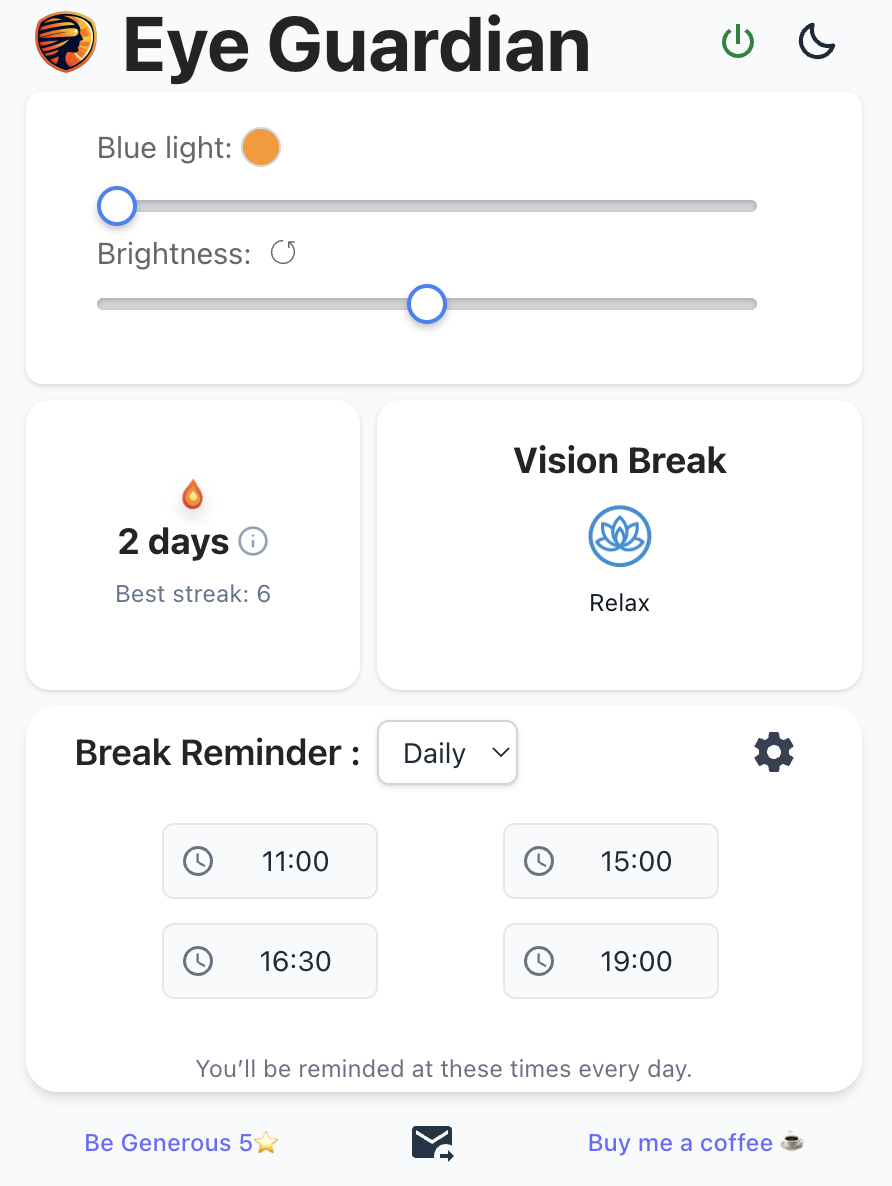
Open Eye Guardian popup by clicking on the icon extension
Blue Light Filter
Customize screen warmth and reduce eye strain by choosing your preferred blue light filter color
Screen Dimmer
Adjust screen brightness to dim or brighten your display for optimal comfort
Vision Break
Do Eyeletic exercises during breaks to train and relax your eyes. Practice daily to increase your eye health and build your streak
Break Reminder
Choose either daily or pomodoro reminder to help build your focus and break time while reminding you to take care of your visual health
Test Your Vision
Finally, you'll be able to test/train your vision for informational purpose by clicking on the "test your vision" button
Need Help?
Have questions about Eye Guardian? We're here to help you get the most out of your eye protection experience.
Be a Super Hero
Help others discover Eye Guardian by sharing your experience